
FAQ
FAQ(English)
How do I import book information from OPAC to RefWorks?
- You can import book information from OPAC to RefWorks from the following screen.
- You can import book information directly (direct import) to RefWorks without downloading a plugin.
- Register as a new user only the first time.
- Click "Book Management" on the bibliography search result list screen or bibliography details screen.
(The bibliography to be imported must be selected on the bibliography search result list screen.) - The "Select Export Destination" pop-up appears. Select "RefWorks."
- The selected bibliography is imported to RefWorks. (If you have not logged in yet, the login screen appears. In that case, enter your login name and password.)
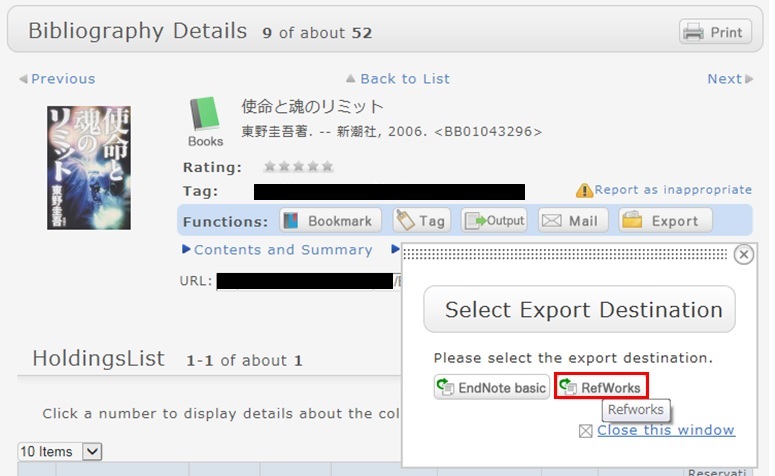
Reference:
RefWorks (SUNMEDIA)
リンク

国立国会図書館 函館中央図書館
(函館大学論究・函大商学論究)
カレンダー
| 日 | 月 | 火 | 水 | 木 | 金 | 土 |
27 | 28 | 29 | 30 | 1 | 2 | 3 |
4 | 5 | 6 | 7 | 8 | 9 | 10 |
11 | 12 | 13 | 14 | 15 | 16 | 17  |
18 | 19 | 20 | 21 | 22 | 23 | 24 |
25 | 26 | 27 | 28 | 29 | 30 | 31 |
-
9:00-20:00
-
9:00-13:00
-
休館